Mostrando las entradas con la etiqueta Service Pack. Mostrar todas las entradas

25 de mayo de 2009

Bug In SharePoint Service Pack 2

No deja de ser una noticia preocupante, y si bien se de la existencia del mismo desde hace unos días, estaba esperando la confirmación en el Blog Oficial de SharePoint para poder comentárselas.

De que se trata, bien, básicamente todos quienes nos aventuramos a implementar el SP2 en entornos de PRUEBA, (Recuerden mis consejos sobre la implementación temprana de este tipo de Actualizaciones en entornos PRODUCTIVOS) notamos que SharePoint, pasa de Versión Registrada a Versión TRIAL luego que instalamos esta actualización, y si, no deja de ser un tema importante, tengan en cuenta que nuestros servidores EN PRODUCCION caducaran a los 180 Días.. La buena noticia es que ya se esta trabajando en el desarrollo de un Fix para esta situación, y de que podemos solucionar este inconveniente de forma manual :

  • Debemos re-introducir la clave de producto en la administración central de SharePoint (KB article), a mediante la opción de Convertir el Tipo de Licencia en el Tab de Operaciones (Ultima Opción de la Columna de la Izquierda.)

Les dejo el Q&A directamente desde el articulo Oficial :

Q&A

Which products are affected by this?
Applying Service Pack 2 to any of the following products will result in this issue: Office SharePoint Server 2007, Project Server 2007, Form Server 2007, Search Server 2008 and Search Server 2008 Express.

Windows SharePoint Services 3.0 is not affected by this issue.

What can I do to fix it?
To work around this issue customers will need to re-enter their Product ID numbers (PID) on the Convert License Type page in Central Administration.  Please see this KB article for detailed steps. 

Customers can also wait for the hotfix (available for free from http://support.microsoft.com) to resolve this issue.

Product ID numbers (PIDs) can be retrieved by logging into the Volume Licensing Service Center.

Note: For Search Server 2008 Express the only way to resolve this issue is to apply the hotfix.

What is Microsoft doing to fix it?
Microsoft is working on a hotfix and public update for the product. We will update this blog post with details and a link to the hotfix as soon as it is available.

Do I need to update all of the servers in my farm?
No. The Product ID number only needs to be entered once.

What if I haven’t installed SP2 yet but want to? What should I do?
You can continue to plan for and install Service Pack 2 for SharePoint Server 2007 with the additional step of re-entering your Product ID number after the installation is complete by following the instructions in this KB article.

Does this issue impact anything else?
The issue only activates the product expiration date. The activation of the expiration date does not affect the normal function of SharePoint up until the expiration date passes, at which point SharePoint will be inaccessible for end-users. This issue does not affect customer’s data, configuration or application code.

I can’t find/don’t know my original PID, where can I find it?
Product ID numbers (PIDs) can be retrieved by logging into the Volume Licensing Service Center.

4 de mayo de 2009

A Seguir Actualizando, ahora con el Update de Abril

En realidad no se si es bueno o malo, lo cierto es que muchos usuarios se van a marear con tantas actualizaciones en un lapso de muy pocos días, y es que fueron liberadas las Actualizaciones o Cummulative Updates de ABRIL para SharePoint Services y Server 2007.

MossSP2

Pero si recién salió el Service Pack 2???? Es lo que todos tienen que estar pensando, Y Por que no se los incluyo en el SP2??? lo mismo me pregunto yo, pero para aclarar el tema, veamos lo siguiente.

1 – Se RECOMIENDA INSTALAR el CU de Abril DESPUES de habar instalado el Service Pack 2, tanto para Wss 3 como para Moss 2007

2 – Estos CU están DISPONIBLES UNICAMENTE BAJO DEMANDA, osea que hay que solicitarlos a Microsoft para instalarlo.

3 – MI CONSEJO es NO Instalarlos hasta que no se presente uno de los ERRORES MENCIONADOS para los cuales aplica el CU.

WSS 3
http://support.microsoft.com/hotfix/KBHotfix.aspx?kbnum=968850&kbln=en-us

MOSS 2007
http://support.microsoft.com/hotfix/KBHotfix.aspx?kbnum=968859&kbln=en-us

Algunos Blogs con información del tema:

http://blogs.technet.com/stefan_gossner/archive/2009/05/01/the-april-cumulative-update-for-wss-v3-and-moss-2007-has-been-released-yesterday.aspx

http://blogs.msdn.com/joerg_sinemus/archive/2009/05/01/should-i-install-sp2-and-or-april-cu.aspx

Lo cierto es que 2 Updates Importantes, con diferencia de 3 o 4 días, es mucho para cualquier producto y para cualquier administrador de plataforma, así que espero con este articulo, haber despejado las dudas mas importantes a la hora de pensar Que Hacer.

28 de abril de 2009

SharePoint 2007 SP2 Install & Benefits

Directamente desde el Blog Oficial de SharePoint, les dejo la guia de Instalacion y los beneficios mas importantes del SP2.

Installation Steps

To keep all the files in a SharePoint installation up-to-date, the following packages need to be applied on all servers in the farm. Service Pack 2 contains all fixes released through February of this year, so customers can install it directly on RTM build of the products.

  1. Service Pack 2 for Windows SharePoint Services 3.0
  2. Service Pack 2 for Windows SharePoint Services 3.0 Language Pack (if applicable)
  3. Service Pack 2 for Office SharePoint Server 2007
  4. Service Pack 2 for Office SharePoint Server 2007 Language Pack (if applicable)

After applying the preceding updates, run the SharePoint Products and Technologies Configuration Wizard or "psconfig –cmd upgrade –inplace b2b -wait” in command line. This needs to be done on every server in the farm with SharePoint installed.  The version of content databases should be 12.0.0.6425 after successfully applying these updates.

For more in-depth guidance for the update process, we recommend that customers refer to the following articles. These articles provide a correct way to deploy updates, identify known issues (and resolutions), and provide information about creating slipstream builds.

Deploy software updates for Windows SharePoint Services 3.0
http://technet.microsoft.com/en-us/library/cc288269.aspx
Deploy software updates for Office SharePoint Server 2007
http://technet.microsoft.com/en-us/library/cc263467.aspx

Create an installation source that includes software updates (Windows SharePoint Services 3.0)
http://technet.microsoft.com/en-us/library/cc287882.aspx
Create an installation source that includes software updates (Office SharePoint Server 2007)
http://technet.microsoft.com/en-us/library/cc261890.aspx

Benefits

Customers can be benefited from the following enhancements with Service Pack 2.

  • Performance and Availability Improvements

Service Pack 2 includes many fixes and enhancements designed to improve performance, availability, and stability in your server farms, including:

    • New Timer job automatically rebuilds content database index to improve database performance.
    • When a content database is marked as read-only, the user interface will be modified so users cannot perform tasks that require writing to the database.
    • Performance enhancement across nearly all the components.
  • Improved Interoperability

Service Pack 2 continues to improve SharePoint interoperability with other products and platforms.

    • Broader support of browsers
      Internet Explorer 8 is added into Level 1 browser support.
      FireFox 2.0/3.0 is added into Level 2 browser support.
    • Provide improved client integration user experience with Form Based Authentication. Now the client application can store user credentials instead of asking for them every time. For more technical details please refer to the updated articles on TechNet.
      Configure forms-based authentication (Office SharePoint Server
      http://technet.microsoft.com/en-us/library/cc262201.aspx
      Configure forms-based authentication (Windows SharePoint Services)
      http://technet.microsoft.com/en-us/library/cc288043.aspx
  • Getting Ready for SharePoint Server 2010

A new preupgradecheck operation is added to stsadm tool. It can be used to scan your server farm to establish whether it is ready for upgrade to SharePoint Products and Technologies "14". It identifies issues that could present obstacles to the upgrade process. It checks for several SharePoint Products and Technologies "14" system requirements, including the presence of Microsoft® Windows Server® 2008 and a 64-bit hardware, and provides feedback and best practice recommendations for your current environment, together with information on how to resolve any issues that the tool discovers. 

The full explanation of SP2 benefits can be downloaded here:
http://go.microsoft.com/fwlink/?LinkId=148551

Related Technical Resources

Service Pack 2 Overview
http://go.microsoft.com/fwlink/?LinkId=148374

Updates Resource Center for SharePoint Products and Technologies
http://technet.microsoft.com/en-us/office/sharepointserver/bb735839.aspx

The full list of changes can be found here: (Excel 2007 format)
Windows SharePoint Services 3.0 SP2 Changes
Office SharePoint Server 2007 SP2 Changes

Customers can also go to this KB article for a full list of downloads for Office System 2007 SP2.
http://support.microsoft.com/kb/968170

Last but not the least important: the issue with mergecontentdb stsadm operation is fixed in SP2.

Wss 3 SP2 Slipstream Version

Para quienes necesiten implementar SharePoint Services desde CERO, esta es la mejor opcion, descargarlo directamente con SP2 Incluido.

Slipstream Builds For Windows SharePoint Services 3.0

Windows SharePoint Services 3.0 with SP2, x64
http://www.microsoft.com/downloads/details.aspx?FamilyId=9FB41E51-CB03-4B47-B89A-396786492CBA&displaylang=en

Windows SharePoint Services 3.0 with SP2, x86
http://www.microsoft.com/downloads/details.aspx?FamilyId=EF93E453-75F1-45DF-8C6F-4565E8549C2A&displaylang=en

SP2 Bonus! Preupgradechecker

stsadmpreup

Seguramente, este Service Pack sera el ultimo antes de la liberacion de SharePoint 2010, y es mas que claro que muchos van a comenzar a Migrar sus plataformas en el primer momento en el que este disponible la nueva version, y, como antes teniamos el Prescan, en esta oportunidad es el STSADM quien incluye el parametro PreuPgradeCheck que sera necesario para la migracion de 2007 a 2010.

Hay mucha informacion disponible en este momento, en el siguiente articulo de Technet, http://support.microsoft.com/kb/960577/.

Entonces, A Prepararse! y tengan en cuenta, que el SP2 sera OBLIGATORIO si piensan en Migrar a 2010…

SharePoint SP2 Is Here!

Despues de tanta espera y tal como lo prometio el equipo de Microsoft, ya esta disponible el Service Pack 2 de SharePoint para descargar directamente…

Todavia no lo pude probar asi que no puedo darles Feedback pero esta noche seguramente ya tendre mis resultados.

Since Service Pack 2 improves performance, stability and availability for SharePoint server farm, and it is also a requirement to upgrade to SharePoint 2010, we encourage everyone to talk with their customers to start planning to apply Service Pack 2 on their server farm.

KB Article Links

Description of Windows SharePoint Services 3.0 SP2 and of Windows SharePoint Services 3.0 Language Pack SP2
http://support.microsoft.com/kb/953338
Description of 2007 Microsoft Office servers Service Pack 2 (SP2) and of 2007 Microsoft Office servers Language Pack Service Pack 2 (SP2)
http://support.microsoft.com/kb/953334

Related Resources

About Service Pack 2 for SharePoint Product and Technologies (marketing doc, talks about benefit)

http://go.microsoft.com/fwlink/?LinkId=148551

Service Pack 2 Overview (TechNet article links, very useful)
http://go.microsoft.com/fwlink/?LinkId=148374

Updates Resource Center for SharePoint Products and Technologies
http://technet.microsoft.com/en-us/office/sharepointserver/bb735839.aspx

The full list of changes in SP2 (Excel 2007 format)
Windows SharePoint Services 3.0 SP2 Changes
2007 Office Servers SP2 Changes

KB article for a full list of downloads for Office System 2007 SP2 (client & server).
http://support.microsoft.com/kb/968170

And Finaly! The Download Links

WSS Specific Download Locations

  • Windows SharePoint Services 3.0 Service Pack 2 (x86)

http://www.microsoft.com/downloads/details.aspx?FamilyId=79BADA82-C13F-44C1-BDC1-D0447337051B

  • Windows SharePoint Services 3.0 Service Pack 2 (x64)

http://www.microsoft.com/downloads/details.aspx?FamilyId=79BADA82-C13F-44C1-BDC1-D0447337051B

  • Windows SharePoint Services 3.0 Language Pack Service Pack 2 (x86)

http://www.microsoft.com/downloads/details.aspx?FamilyId=085E5AC8-58F6-4CF9-8012-33B95EE36C0F

  • Windows SharePoint Services 3.0 Language Pack Service Pack 2 (x64)

http://www.microsoft.com/downloads/details.aspx?FamilyId=2C2B6CAF-B46D-45EB-AC4D-DEAAA48C3A2C

    MOSS Specific download locations are here:

    • 2007 Microsoft Office servers Service Pack 2 (x86)

    http://www.microsoft.com/downloads/details.aspx?FamilyId=B7816D90-5FC6-4347-89B0-A80DEB27A082

    • 2007 Microsoft Office servers Service Pack 2 (x64)

    http://www.microsoft.com/downloads/details.aspx?FamilyId=B7816D90-5FC6-4347-89B0-A80DEB27A082

    • 2007 Microsoft Office servers Language Pack Service Pack 2 (x86)

    http://www.microsoft.com/downloads/details.aspx?FamilyId=01C6A3E8-E110-4956-903A-AD16284BF223

    • 2007 Microsoft Office servers Language Pack Service Pack 2 (x64)

    http://www.microsoft.com/downloads/details.aspx?FamilyId=66C5026F-9F47-4642-8378-2526918009FA

    Enjoy!

    8 de septiembre de 2008

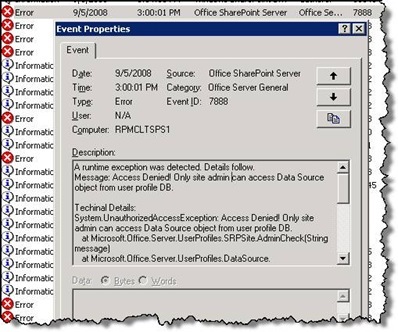
    Error 7888

    Uno de los principales problemas que se presenta luego de las implementaciones, es que el Event Viewer se comienza a llenar con el evento 7888 :

    Error78881

    Event Type: Error
    Event Source: Office SharePoint Server
    Event Category: Office Server General
    Event ID: 7888
    Date: 9/5/2008
    Time: 3:00:01 PM
    User: N/A
    Computer: YOURMOSSSERVER
    Description:
    A runtime exception was detected. Details follow.
    Message: Access Denied! Only site admin can access Data Source object from user profile DB.

    Techinal Details:
    System.UnauthorizedAccessException: Access Denied! Only site admin can access Data Source object from user profile DB.
    at Microsoft.Office.Server.UserProfiles.SRPSite.AdminCheck(String message)
    at Microsoft.Office.Server.UserProfiles.DataSource._LoadDataSourceDef(IDataRecord rec)
    at Microsoft.Office.Server.UserProfiles.DataSource._LoadDataSourceDef(String strDSName)
    at Microsoft.Office.Server.UserProfiles.DataSource..ctor(SRPSite site, Boolean fAllowEveryoneRead)
    at Microsoft.Office.Server.UserProfiles.DataSource..ctor(SRPSite site)
    at Microsoft.Office.Server.UserProfiles.UserProfileConfigManager.GetDataSource()
    at Microsoft.Office.Server.UserProfiles.BDCConnector.RefreshConfiguration(String sspName)

    For more information, see Help and Support Center at http://go.microsoft.com/fwlink/events.asp.

    La Solucion es permitirle a la cuenta de SharePoint Search Service administrar los permisos del Manage User Profiles.

    1. Modificar la Cuenta:
      1. Central Administration > Operations > Services on Server > Office SharePoint Server Search Service Settings
      2. Farm Search Service Account

        clip_image004[4]
    2. Otorgarle Permisos 
      1. Shared Services Administration: SharedServices YourMoss > Manage Permission
      2. Si la cuenta no esta listada, adicionarla y modificarla.
        clip_image006[4]
      3. Seleccionar Permisos
        1. Permitirle a la cuenta el permiso de Manage user profiles.
          clip_image008[4]

    Y Con esto, eliminamos el Error de nuestra lista, espero les sea de utilidad.

    11 de diciembre de 2007

    ServicePack 1 para Sharepoint YA DISPONIBLE!

    Ya se encuentran disponibles los Service Packs 1 para Sharepoint Server y Sharepoint Designer.
    Para Sharepoint Services - Solo 27Mb
    Para Sharepoint Designer - Pesa 90Mb
    Para Sharepoint Server 2007 - 78MB x86 y 166MB para x64! (Por que tanta diferencia?)
    Para Office 2007 - Pesa 218Mb

    Recomendaciones : Para Instalar el SP1 de Sharepoint Server 2007, tenemos que tener previamente instalado el SP1 de Sharepoint Services... y es necesario el Microsoft Installer 3.1.

    Los detalles y la informacion acicional ya la habia publicado en un post anterior.