Mostrando las entradas con la etiqueta SQL 2008. Mostrar todas las entradas

26 de abril de 2011

SQL Server 2008 R2 Update del Developers Training Kit

Importante material, que si bien ya tiene un tiempo, a mas de alguno le va a ser de utilidad, se trata de la actualización del Developers Training Kit, y en el podremos encontrar Presentaciones y demos como estos :

New Content: Build Your First Microsoft BI Solution with SQL Server 2008 R2
This update includes a rich new set of content designed for developers who want to learn how to build their first Microsoft Business Intelligence solution with SQL Server 2008 R2. Microsoft BI solutions leverage your existing technology investments in .NET, SQL Server and Office to develop rich integrated reporting and analytics experiences that empower users to gain access to accurate, up-to-date information for better, more relevant decision making. This content is a complete training course that contains eleven units covering all the key aspects of Microsoft BI solution development. You can find it by navigating to the Getting Started - BI Developers page. Here is a summary of what’s included:

  • 31 presentations (PowerPoint slides, videos and transcripts included)
  • 27 demos (installer scripts, videos and transcripts included)
  • 12 hands on labs (installer scripts included)
Here is a breakdown of each unit and its associated content:
  1. Build Your First Microsoft BI Solution with SQL Server 2008 R2
    Presentation: Understanding Business Intelligence
    Demo: Delivering Information to Decision Makers with a Microsoft BI Solution
    Presentation: Introducing Microsoft BI Solution Development
    Demo: Introducing the Microsoft BI Development Toolset
  2. Introduction to BI Modeling Techniques
    Presentation: Designing Data Models for Microsoft BI Solutions
    Demo: Exploring a Sample Dimensional Data Model
    Presentation: Designing Semantic Models for Microsoft BI Solutions
    Demo: Creating a Data Model with the Microsoft Entity Framework
    Hands On Lab: Your First Look at the SQL Server 2008 R2 Sample Databases
    Hands On Lab: Building Your First Semantic Model with the ADO.NET Entity Framework
  3. Introduction to SQL Server 2008 R2 Integration Services
    Presentation: Introducing ETL Processing with SQL Server 2008 R2 Integration Services
    Presentation: Implementing Control Flow in a SQL Server 2008 R2 Integration Services Package
    Demo: Implementing Control Flow in a SQL Server 2008 R2 Integration Services Package
    Presentation: Implementing Data Flow Tasks in a SQL Server 2008 R2 Integration Services Package
    Presentation: Loading Fact and Dimension Tables in a SQL Server 2008 R2 Integration Services Package
    Demo: Implementing Data Flow in a SQL Server 2008 R2 Integration Services Package
    Hands On Lab: Building Your First Extract-Transform-Load Process with SQL Server 2008 R2 Integration Services
  4. Introduction to SQL Server 2008 R2 Reporting Services
    Presentation: Reporting Fundamentals with SQL Server 2008 R2 Reporting Services
    Presentation: SQL Server 2008 R2 Reporting Services Report Design Basics
    Demo: Developing a Simple SQL Server 2008 R2 Reporting Services Report with a Relational Data Source
    Presentation: Adding interactivity to a SQL Server 2008 R2 Reporting Services Report
    Demo: Adding Interactivity to a SQL Server 2008 R2 Reporting Services Report
    Presentation: Extending SQL Server 2008 R2 Reporting Services Reports with Custom Logic
    Hands On Lab: Building Your First Relational Report with SQL Server 2008 R2 Reporting Services
  5. Publishing and Accessing SQL Server 2008 R2 Reporting Services Reports
    Presentation: Publishing SQL Server 2008 R2 Reporting Services Reports
    Demo: Publishing SQL Server 2008 R2 Reporting Services Reports
    Presentation: Enabling Self-Service Reporting with SQL Server 2008 R2 Shared Components
    Demo: Enabling Self-Service Reporting by Publishing SQL Server 2008 R2 Reporting Services Shared Components
    Presentation: Accessing SQL Server 2008 R2 Reporting Services Reports Programmatically
    Demo: Developing Embedded SQL Server 2008 R2 Reporting Services Applications
    Hands On Lab: Building Your First Reporting Application with the Visual Studio 2010 ReportViewer Control
  6. Introduction to SQL Server 2008 R2 Analysis Services
    Presentation: Analysis Fundamentals with SQL Server 2008 R2 Analysis Services
    Presentation: Understanding the Components of a SQL Server 2008 R2 Analysis Services Database
    Demo: Developing a SQL Server 2008 R2 Analysis Services Database
    Presentation: Introduction to SQL Server 2008 R2 Analysis Services Programming
    Demo: Developing a Time Dimension with SQL Server 2008 R2 Analysis Services
    Demo: Enhancing the End User Experience of a SQL Server 2008 R2 Analysis Services Cube
    Hands On Lab: Building Your First Cube with SQL Server 2008 R2 Analysis Services
  7. Introduction to SQL Server 2008 R2 Analysis Services Query Syntax
    Presentation: Introduction to SQL Server 2008 R2 Analysis Services MDX
    Presentation: Exploring SQL Server 2008 R2 Analysis Services MDX Query Techniques
    Demo: Introducing SQL Server 2008 R2 Analysis Services MDX Query Development
    Presentation: Exploring SQL Server 2008 R2 Analysis Services Cube Calculations
    Demo: Enriching a SQL Server 2008 R2 Analysis Services Cube with Calculations
    Hands On Lab: Building Your First Queries and Calculations with SQL Server 2008 R2 Analysis Services MDX
  8. Accessing SQL Server 2008 R2 Analysis Services Data
    Presentation: Developing SQL Server 2008 R2 Reporting Services Reports for Analysis Services
    Demo: Developing a Simple SQL Server 2008 R2 Reporting Services Report with an Analysis Services Cube
    Presentation: Using Excel 2010 as an Analysis Services Client
    Demo: Creating an Excel 2010 PivotTable Using a SQL Server 2008 R2 Analysis Services Cube
    Presentation: Using SharePoint 2010 Excel Services with Analysis Services Data
    Demo: Publishing and Sharing SQL Server 2008 R2 Analysis Services Cube Data with SharePoint 2010 Excel Services
    Hands On Lab: Building Your First Multidimensional Report with SQL Server 2008 R2 Reporting Services
  9. Introduction to SharePoint 2010 PerformancePoint Services
    Presentation: Performance Management Fundamentals with SharePoint 2010 PerformancePoint Services
    Demo: Delivering an Interactive Performance Management Dashboard with SharePoint 2010 PerformancePoint Services
    Presentation: Developing KPI's and Scorecards with SharePoint 2010 PerformancePoint Services
    Demo: Developing KPIs and Scorecards with SharePoint 2010 PerformancePoint Services
    Presentation: Developing Reports and Dashboards with SharePoint 2010 PerformancePoint Services
    Demo: Developing Interactive Reports and Dashboards with SharePoint 2010 PerformancePoint Services
    Hands On Lab: Building Your First Dashboard with SharePoint 2010 PerformancePoint Services
  10. Introduction to Data Mining with SQL Server 2008 R2 Analysis Services
    Presentation: Data Mining Fundamentals with SQL Server 2008 R2 Analysis Services
    Demo: Developing Data Mining Models with SQL Server 2008 R2 Analysis Services
    Presentation: Programming SQL Server 2008 R2 Analysis Services Data Mining
    Demo: Embedding SQL Server 2008 R2 Analysis Services Data Mining in a Custom Application
    Hands On Lab: Building Your First Data Mining Model with SQL Server 2008 R2 Analysis Services
  11. Introduction to Self-Service Reporting and Analysis with SQL Server 2008 R2
    Presentation: Self-Service Reporting Fundamentals with SQL Server 2008 R2
    Demo: Self-Service Reporting with Report Builder 3.0
    Presentation: Self-Service Analysis Fundamentals with SQL Server 2008 R2
    Demo: Self-Service Analysis with SQL Server 2008 R2 PowerPivot for Excel 2010
    Demo: Publishing and Sharing SQL Server 2008 R2 PowerPivot Workbooks with SharePoint 2010 Excel Services
    Hands On Lab: Building and Sharing Your First Report Builder 3.0 Report
    Hands On Lab: Building and Sharing Your First SQL Server 2008 R2 PowerPivot for Excel Workbook

Other Content
This update includes all of the content from the previous release. Here’s a quick summary of what is included:
  • Getting Started Building Web Applications With SQL Server
    This content is for web developers who are new to SQL Server and are just getting started building their first solution. You can find it by navigating to the Getting Started - Web Developers page.
  • SQL Server 2008 R2 Update for Developers
    This content provides a complete training course with six units covering all the key improvements in SQL Server 2008 R2, including StreamInsight and Data-tier applications. Integration with Office 2010 and SharePoint 2010 is also covered. You can find this content by navigating to the SQL Server 2008 R2 - Overview page.
  • SQL Server 2008 Update for Developers
    This content covers all the key improvements in SQL Server 2008, including new date and time data types, spatial data types, FILESTREAM, Transact-SQL improvements and support for .NET CLR assemblies. You can find it by navigating to the SQL Server 2008 - Overview page.

Usability Improvements
This update features several usability improvements that we hope will make it easier to navigate and use the training kit:
  • The master configuration wizard no longer auto-starts and can be launched manually from the Prerequisites page if needed. This makes it easier to use individual demos or hands-on labs without having to install the prerequisites for the entire training kit.
  • Remote SQL Server instances are now supported for many demos and hands on labs. Unfortunately we were not able to add support for remote SharePoint 2010 installations. This still requires manual intervention.
  • We reworked the menu structure and content pages to improve navigation and discovery of content.
  • We added a desktop shortcut to the main training kit page (default.htm).

Descargas : http://www.microsoft.com/downloads/en/details.aspx?displaylang=en&FamilyID=fffaad6a-0153-4d41-b289-a3ed1d637c0d

27 de abril de 2010

Free Ebook! SQL 2008 R2

Ya disponemos gratuitamente de un Ebook de SQL 2008 en su versión R2, versión que será liberada en pocos días…

image

Table of Contents

PART I   Database Administration

CHAPTER 1   SQL Server 2008 R2 Editions and Enhancements 3
CHAPTER 2   Multi-Server Administration 21
CHAPTER 3   Data-Tier Applications 41
CHAPTER 4   High Availability and Virtualization Enhancements 63
CHAPTER 5   Consolidation and Monitoring 85

PART II   Business Intelligence Development

CHAPTER 6   Scalable Data Warehousing 109
CHAPTER 7   Master Data Services 125
CHAPTER 8   Complex Event Processing with StreamInsight 145
CHAPTER 9   Reporting Services Enhancements 165
CHAPTER 10   Self-Service Analysis with PowerPivot 189

Descargar Aqui

24 de marzo de 2010

Analysis Services Vs. Power Pivot

Excelente comparativa de estas 2 Tecnologías para en análisis de Datos, en particular con Power Pivot que esta haciendo su aparición hace muy poco tiempo, veremos que tiene para proponer a todos quienes trabajan con Analysis Services…

image

Directamente desde el Blog de Power Pivot, el Articulo completo con la lista de Comparación, AQUI.

8 de marzo de 2010

BI With SharePoint 2010 Presentation

Esta presentacion corresponde a un caso de exito de implementacion de la plataforma Microsoft para BI en Hospitales (WhiteCloud Regional Medical Center) y es un buen ejemplo de aplicacion de SharePoint 2010, SQL Server 2008 y Office 2010. Un excelente material para analizar y presentar todo el poder de estas soluciones a nuestros clientes.

image

Descargar la Presentacion 

Resumen en Ingles : Next generation decision support systems are critical to hospital success, and highly obtainable using the Microsoft technologies you likely already own. Familiar Microsoft products like Office and SharePoint Server contain powerful business intelligence capabilities that are brought to life by the underlying data warehousing and analytic capabilities of the SQL Server platform. This presentation will show you how WhiteCloud Analytics' provider-focused BI solutions can help you improve your hospital's clinical, operational and financial outcomes. WhiteCloud uses Microsoft software you likely own to deliver analytic applications such as: Executive & Operational Dashboards, Throughput/Length of Stay Optimization, Service Line Optimization, Clinical Integration Dashboards, and Revenue Cycle Management Optimization.

24 de enero de 2010

SharePoint 2010 Virtual Machine Available!!!

image image

Finalmente, disponemos de una Virtual Machine de SharePoint 2010 BETA, el unico tema es que esta solo disponible para Partners inscriptos en el SDPS, el SharePoint Depoyment Planning Services, esta virtual, que en realidad son 2 servers, tiene absolutamente todo lo necesario para realizar excelentes demostraciones, ya que cuenta con lo siguiente :

Virtual Machine Software and Pre-Configuration

Virtual machine “a” contains the following pre-configured software:

  1. Windows Server 2008 SP2 Standard Edition x64, running as an Active Directory Domain Controller for the “CONTOSO.COM” domain with DNS and WINS
  2. Microsoft SQL Server 2008 SP2 Enterprise Edition with Analysis, Notification, and Reporting Services
  3. Microsoft Office Communication Server 2007 R2
  4. Visual Studio 2010 Beta 2 Ultimate Edition
  5. Microsoft SharePoint Server 2010 Enterprise Edition Beta 2
  6. Microsoft Office Web Applications Beta 2
  7. FAST Search for SharePoint 2010 Beta 2
  8. Microsoft Project Server 2010 Beta 2
  9. Microsoft Office “Mondo” 2010 Beta 2
  10. Microsoft Office Communicator 2007 R2

Virtual machine “b” contains the following pre-configured software:

  1. Windows Server 2008 R2 Standard Evaluation Edition x64, joined to the “CONTOSO.COM” domain
  2. Microsoft Exchange Server 2010

Los Requerimientos del Sistema son :

image 

Deben Registrarse previamente en : https://www.partnersdps.com/public/Pages/default.aspx y es solo para Partners Registrados, seguramente en breve tendremos una VM Similar en forma publica…

20 de noviembre de 2009

SQL Live Monitor

image

Problemas de Performance en los Servidores SQL de SharePoint? si tienen problemas de este tipo, en codeplex se acaba de publicar un interesante proyecto, SQL Live Monitor, nos permite hacer un relevamiento intensivo de que es lo que esta pasando con nuestro server…

http://sqlmonitor.codeplex.com/

19 de noviembre de 2009

Free SQL 2008 Book

Un nuevo Libro de SQL 2008 en forma gratuita :

Introducing Microsoft SQL Server 2008
by Peter DeBetta, Greg Low, and Mark Whitehorn ISBN: 9780735625587
Learn about major new features in SQL Server 2008 including security, administration, and performance.
Introducing Microsoft SQL Server 2008:
Chapter 1: Security and Administration
Chapter 2: Performance
Chapter 3: Type System
Chapter 4: Programmability
Chapter 5: Storage
Chapter 6: Enhancements for High Availability
Chapter 7: Business Intelligence Enhancements

View Chapter 1, or sign up to download the entire e-book.
Microsoft Press - Microsoft SQL Server 2008 Free E-Book Offer

Instalar Power Pivot sobre SharePoint 2010

Ya se encuentra disponible la documentacion de instalacion de Power Pivot, un producto que mencionaba en un post del dia de ayer y que seguramente sera de mucha utilidad a todos los que trabajen sobre BI.

http://msdn.microsoft.com/en-us/library/ee210654(SQL.105).aspx

Considerations for Installing SQL Server PowerPivot for SharePoint
How to: Install the PowerPivot for Excel Add-in
How to: Install PowerPivot for SharePoint on a New SharePoint Server
How to: Install PowerPivot for SharePoint on an Existing SharePoint Server
How to: Install PowerPivot for SharePoint from the Command Prompt
How to: Scale a PowerPivot for SharePoint Deployment
How to: Update the Analysis Services OLE DB Provider on an Excel Services Computer
How to: Install ADOMD.NET on Web Front-End Servers Running Central Administration
Setup Command Reference (PowerPivot for SharePoint)

Mas Informacion en :

Conceptos
Hardware and Software Requirements (PowerPivot for SharePoint)Planning and Architecture (PowerPivot for SharePoint)Deployment (PowerPivot for SharePoint)Configure PowerPivot for SharePoint

Otros Recursos
Troubleshoot Installation (PowerPivot for SharePoint)

30 de septiembre de 2009

Error de SKU al Crear Nodo en cluster de SQL 2008

Hoy nos encontramos con un error al momento de instalar un nuevo nodo a un cluster de SQL 2008, el Error que se presentaba al momento de la instalacion era :

The Current SKU is Invalid

Siendo que estabamos 100% seguros de que el Key de instalacion era ese y ya habiamos instalado con ese mismo Medio.

Muchos Blogs hablan de la instalacion via Linea de comandos :

setup.exe /ACTION=AddNode /INSTANCENAME="MSSQLSERVER"
/SQLSVCACCOUNT="<Domain\Account>" /SQLSVCPASSWORD="<Password>"
/AGTSVCACCOUNT="<Domain/Account>", /AGTSVCPASSWORD="<Password>"
/ASSVCACCOUNT="<Account/Password>" /ASSVCPASSWORD=”<Password>” /INDICATEPROGRESS

Pero la solucion simple y rapida, pasa solamente por copiar los archivos de instalacion al Servidor, editar el archivo DefaultSetup.ini y copiar la Key de Instalacion del mismo, luego eliminan el archivo y vuelven a instalar el nodo, especificando la Key en forma manual y listo…

2 de agosto de 2009

Mantenimiento de las Bases de Datos de SharePoint

Esta es ua consulta que la mayoria de los clientes me hacen al momento de Implementar SharePoint, que pasa con las bases de datos? cuales son las importantes? como tengo que mantenerlas? que tengo que Respaldar y como?

Para responder todas estas preguntas, les dejo una serie de articulos de Technet, donde ademas, ya se encuentra disponible un nuevo WhitePaper sobre el Mantenimiento de las Bases.

Database maintenance for Office SharePoint Server 2007 (white paper)

This white paper provides information and guidelines for maintaining the databases that host Microsoft SharePoint Products and Technologies data and configurations. It describes and provides examples of the database maintenance tasks that we recommend when using SharePoint Products and Technologies.

Download this white paper as a Microsoft Office Word document (.doc) file.

Database Maintenance for SharePoint Products and Technologies

Otros Enlaces de interes:

Database maintenance (Office SharePoint Server 2007)
Planning and Monitoring SQL Server Storage for Office SharePoint Server: Performance Recommendations and Best Practices (white paper)
Add, split, and merge content databases (Office SharePoint Server 2007)
Move content databases (Office SharePoint Server 2007)
Move all databases (Office SharePoint Server 2007)

29 de mayo de 2009

All About SharePoint Databases

Bueno, este post es mas una referencia de Links necesarios para todos los que están trabajando con SharePoint, el gran tema de las Bases de datos, y un poco, evitarles algunos dolores de cabeza para buscar información, en el post de anoche les comentaba como eliminar el Windows Internal Database, tenemos varias acciones que podemos realizar, así que les dejo una serie de Links Interesantes.

Tareas Con Bases Links de Referencia
Mover bases de Datos de Contenido de WSS a SQL o entre instancias.
Migración de Windows Internal Database a SQL Server 2005 o 2008
Como Mover las Bases de SQL de una unidad a Otra.
Como Mover las Bases de Configuración y Contenido

Como les decía, esto es mas de Referencia para todos nosotros, así que espero que en el momento que se les planteen estas situaciones, los links aquí mencionados les sean de ayuda.

26 de abril de 2009

Presentación 2do Simposio en México

Aquí les dejo la Presentación que dimos junto a Rubén Colomo en el 2do Simposio, esta también en mi SkyDrive y Slideshare.

En unos minutos estan subiendo las fotos para que las puedan descargar.

14 de abril de 2009

New SharePoint Downloads 04/2009

Microsoft libero en los pasados días 3 herramientas para SharePoint que seguramente serán de mucha utilidad para Developers e IT Pros.

1 – SQL 2008 Reporting Services Add-In for SharePoint

Microsoft SQL Server 2008 Reporting Services Add-in for SharePoint Technologies (Reporting Services Add-in) enables you to take advantage of SQL Server 2008 report processing and management capabilities within Windows SharePoint Services (WSS) 3.0 or Microsoft Office SharePoint Server 2007. The download provides the following functionality:

  • A Report Viewer Web Part that provides report viewing capability, export to other rendering formats, page navigation, search, print, and zoom.
  • Web application pages so that you can create subscriptions and schedules, and manage reports, models, and data sources.
  • Support for using standard Windows SharePoint Services features including document management, collaboration, security, and deployment with report server content types.

2 – Microsoft SharePoint Services 3 Management Pack for Systems Center Operations Manager 2007

This Management Pack monitors the health state of the components in your SharePoint environment that affect performance and availability. When there is an issue that may cause service or performance degradation, Operations Manager 2007 uses the Management Pack to detect the issue, alert you to its existence, and facilitate diagnosis and corrective actions. (updated Apr-09)

3 - Microsoft Office SharePoint Server 2007 Management Pack for System Center Operations Manager 2007

This Management Pack monitors the health state of the components in your SharePoint environment that affect performance and availability. When there is an issue that may cause service or performance degradation, Operations Manager 2007 uses the Management Pack to detect the issue, alert you to its existence, and facilitate diagnosis and corrective actions (updated Apr-09)

Asimismo, les dejo un documento Solicitado, referente al Mantenimiento de las Bases de Datos de SharePoint, un WhitePaper de Microsoft que les será de mucha utilidad.

SharePoint en Windows 2008

Buscando material complementario para lo que va a ser mi presentacion en el Simposio de Mexico sobre este tema, me encontre con un excelente articulo en el blog de SharePoint DAN, donde nos muestra paso a paso como podemos hacer para Construir el Framework, con las configuraciones de Roles y Features.

5 - Introduction to Web Server IIS

Asimismo, una serie de articulos muy interesantes sobre SQL 2008, Kerberos y demas, que seran publicados a la brevedad :

Asi que a esperarlos por que realmente seran de mucha utilidad para toda la comunidad.

10 de marzo de 2009

Integrar Reporting Services 2008 con SharePoint


1 - Instalar Reporting Services 2008 en un servidor que ya sea parte del Farm de SharePoint o instale SharePoint previamente y adicionelo al farm antes de instalar Reporting Services.

2 – Cree y configure la base de datos de Reporting Services en modo Integrado con SharePoint mediante el Reporting Services Configuration Manager.

3 – Descargue el  SQL Server 2008 Reporting Services Add-in for SharePoint Technologies e instalelo utilizando el comando rsSharePoint.msi SKIPCA=1 en todos sus servidores de sharepoint que son parte del farm y sean Front Ends. Seleccione un servidor y ejecute el comando rsCustomAction.exe /i que esta disponible en la carpeta %Temp%.

No ejecute el comando rsCustomAction.exe 2 en otro servidor.

4 – En la consola de Administracion Central, en Administrador de Aplicaciones  -> Reporting Services, permita acceso a la base de datos y configure el Web Service de Reporting Services.

5 – En el sitio que va a usar Reporting Services habilite la integracion mediante la Feature del Site Collection.

Y Listo, en solo 5 pasos tenemos Reporting Services 2008 funcionando en SharePoint 2007.

27 de febrero de 2009

SharePoint News! 02/2009 (3)

Se termina el mes y la semana, mucha informacion para leer en estos dias “Libres”

1 – En el Blog MOSS HOW TO se publico un completo articulo que nos muestra Paso a paso como realizar la integracion de Reporting Services 2008 con SharePoint 2007, totalmente Recomendado.

2 – En SharePoint Happenings lega a su fin una serie de 3 Tricks muy interesantes sobre INFOPATH y VISUAL STUDIO WORKFLOWS, como siempre, muy bien detallados, con screenshots y con valioso contenido.

3 – Continuando con el tema Infopath les dejo otro muy util articulo sobre Enviar informacion de un formulario de Infopath a una lista de SharePoint, muy detallado, con screenshots Step by Step.

4 – Para quienes trabajan con Silverlight, comentarles que se adicionaron 4 nuevos ejemplos al Proyecto de Codeplex BluePrints algunos de ellos muy interesantes…

5 – Aplicar un THEME a un sitio desde CODIGO.

Les adjunto el Codigo fuente necesario para aplicar un tema en forma programatica a un sitio.

using (SPSite parentSite = new SPSite(SPContext.Current.Site.Url))
{
//Allow the unsafe updates in site from the current user
parentSite.AllowUnsafeUpdates = true;
using (SPWeb currentWeb = parentSite.AllWebs[SPContext.Current.Web.Name])
{
using (SPWeb childWeb = currentWeb.Webs[name])
{
childWeb.AllowUnsafeUpdates = true;
//The code line shown below will apply the theme of the parent site to the child site
childWeb.ApplyTheme(currentWeb.Theme);
childWeb.Update();
childWeb.AllowUnsafeUpdates = false;
}
}
parentSite.AllowUnsafeUpdates = false;
}

Por el momento, esto es todo, enjoy!

21 de agosto de 2008

SharePoint's Databases Naked!

Esta es una consulta que recibo muy pero muy seguido : Cual es la estructura de Tablas de las Bases de Datos de SharePoint? Donde se guarda tal o cual Objeto? Como Accedo desde la Base a tal Item?.

radiography_1

Y bien, en el sitio de MSDN podemos encontrar la respuesta a todas estas preguntas, los siguientes son los vínculos con la información acerca de las tablas de SharePoint 2007.

Content Database Tables

Categories Table
ComMd Table
Deps Table
DiskWarningDate Table
Docs Table
DocVersions Table
EventCache Table
EventLog Table
HT_Cache Table
HT_Settings Table
ImmedSubscriptions Table
Links Table
Lists Table
NavNodes Table
Personalization Table
SchedSubscriptions Table
SiteGroupMembership Table
SiteGroups Table
Sites Table (Content Database)
TimerLock Table
UserData Table
UserInfo Table
WebCat Table
WebGroupMembership Table
WebGroups Table
WebMembers Table
WebParts Table
Webs Table
WelcomeNames Table

Configuration Database Tables

AntiVirusVendors Table
CustomTemplates Table
Databases Table
Globals Table
InstalledWebPartPackages Table
Servers Table
Services Table
Sites Table (Configuration Database)
VirtualServers Table
WebPartPackages Table

Stored Procedures

Database Stored Procedures
Globals Stored Procedures
ServersStoredProcedures
Services Stored Procedures
Sites Stored Procedures
VirtualServers Stored Procedures

18 de agosto de 2008

SQL 2008 Ya Es Soportado Por SharePoint

Es la noticia del Momento y fue anunciada por la gente del Blog Oficial de SharePoint Server 2007, y si bien se habia anunciado desde un principio que el Soporte solo podía estar dado cuando se liberara el SP2 de SharePoint, se confirma que con la version de SharePoint SP1 ya estaria soportado el uso de SQL 2008... asi que, a probarlo!

La noticia :

You may already be aware of the recent RTM announcement of SQL Server 2008. We are happy to announce that Office SharePoint Server 2007 SP1 & Windows SharePoint Services 3.0 SP1 now support SQL Server 2008. Our documentation has been updated to include support for SQL Server 2008. Please refer to:

In the next few weeks, we will publish a TechNet article that describes the benefits of running SQL Server 2008 with SharePoint Products and Technologies. Here, we’ve highlighted a few of the benefits that SharePoint customers inherit when choosing to use SQL Server 2008:

1. Improved Manageability

Manageability and governance is important for SharePoint as well as the SQL Server database engine. Now administrators can also benefit from the new management features introduced in SQL Server 2008 – from Policy-based administration to back-up compression. For details, please refer to http://technet.microsoft.com/en-us/library/cc645579(SQL.100).aspx.

2. High Availability

Availability in SQL Server 2008 has been improved through enhancements in data mirroring. For details, please refer to http://technet.microsoft.com/en-us/library/cc645581(SQL.100).aspx.

3. Enhanced Data Security

The SQL Server 2008 database engine introduced new encryption functions that enhance security. SharePoint administrators can take advantage of these new encryption features by simply turning on transparent data encryption (TDE). No additional changes need to be made on the SharePoint side. For details, please refer to http://technet.microsoft.com/en-us/library/cc645578(SQL.100).aspx.

Last but not least, don’t forget to apply SP1 on SharePoint Server 2007 and Windows SharePoint Services 3.0. Keep in mind, SP1 is also a requirement for installing on Windows Server 2008.

Stay tuned for the TechNet article!

8 de agosto de 2008

SQL 2008 Install

Ya con la versión STD Disponible para Pruebas, y en base a algunos comentarios que habían surgido desde las Versiones CTP, me dispuse a probar la instalación de SQL 2008 en un Virtual server Windows 2008.

Algunos Comentarios simplemente y que afectan a SharePoint (Que todavía no esta soportado para SQL 2008)

Lo Primero que note es que la instalación requiere el Framework 3.5 y cuando comienza a instalar me di cuenta de que es el 3.5 CON Sp1, tema a tener en cuenta si lo instalan en servidores del Farm de SharePoint 2007 (Check de todas las funcionalidades de Workflows con Designer, etc, etc)

SQL200801 SQL200802

Luego de la instalación del Framework, solicita la instalación y actualización del siguiente KB 942288

SQL200803

Cuando llegamos a la Ventana de Instalación, vemos lo siguiente :

SQL200804

Siguiendo la estrategia de 2008, la instalación se base en Features :

SQL200805

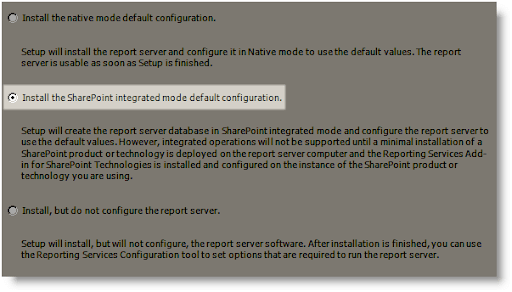
Y lo mas importante para nosotros es la posibilidad de Instalar Reporting Services en modo de Integración con SharePoint!

SQL200806

Uno de los temas que resultaba un poco tediosos en la versión 2005 de Reporting Services ya esta solucionado de esta forma, y bien, por lo demás, toda la instalación se ejecuta sin problemas, no he tenido mas tiempo de probar "a fondo" el resto de las opciones, pero en lo que respecta a SharePoint creo que es lo mas destacable de SQL 2008, y solo me queda esperar ansioso el SP2 (De MOSS) para poder probar este nuevo producto taaaan publicitado... :)